
Haga una Reserva en Línea 24/7
Airport Shuttle of Phoenix fue fundada en 2015 y ahora es una LLC con más de 100,000 clientes. Nuestra oficina principal está a 5 minutos del Aeropuerto Internacional PHX Sky Harbor. Somos la única empresa de shuttles que ofrece servicio de puerta a puerta en todo Arizona las 24 horas del día, los 7 días de la semana. Contamos con muchos conductores que viven en ciudades de todo el estado y vehículos de la empresa.
Tanto la empresa como los conductores se someten a extensas verificaciones de antecedentes y requisitos de seguro para recoger a las personas en el aeropuerto. Contamos con shuttles Mercedes para grupos grandes, SUV Lincoln Navigator, y una variedad de sedanes grandes de 4 puertas como el Lexus ES 300 Hybrid y Lincoln MKZ Hybrid. Actualmente somos la segunda o tercera empresa de transporte aéreo más grande del Estado de Arizona.

Oficina Principal
4600 E Washington St Suite 300
Phoenix, AZ 85034

Premio de Viajes y Hospitalidad 2018‑2023
Testimonios y reseñas
Click here to read lots of excellent reviews by real customers.
The snippet is essentially JavaScript followed by HTML. We only need to translate visible text. There are strings in JS that could be visible? They are internal (like "yes","no") but are code, not user-facing. The user likely wants to translate the visible text like "Click here to read lots of excellent reviews by real customers." and "Check Rates" and the title attribute text: "Airport Shuttle of Phoenix Reviews", "Check Airport Shuttle Rates". Also the phrase inside thetag with a . The "Check Rates" anchor text is "Check Rates". Title "Check Airport Shuttle Rates". Also we need to translate "Airport Shuttle of Phoenix Reviews" maybe. And "Click here to read lots of excellent reviews by real customers." We need to keep all HTML tags exactly as is. Keep city/airport names and codes unchanged: "Phoenix", "Airport Shuttle of Phoenix". Keep phone numbers and URLs unchanged. Return only the translated HTML. The translation must be natural Latin American Spanish for travelers. So maybe "Haz clic aquí para leer muchas opiniones excelentes de clientes reales." But "haz clic aquí" is fine. Could also be "Ver reseñas" but "Click here to read lots of excellent reviews by real customers." Let's think. We want to be natural: "Haz clic aquí para leer muchas reseñas excelentes de clientes reales." The phrase "lots of excellent reviews" might be "muchas reseñas excelentes". So final: "Haz clic aquí para leer muchas reseñas excelentes de clientes reales." But also keep the link's title attribute: "Airport Shuttle of Phoenix Reviews". That could be translated as "Reseñas de Shuttle del Aeropuerto de Phoenix". Since we keep names unchanged, but translation is okay: "Reseñas del Servicio de Transporte del Aeropuerto de Phoenix". That seems fine. The title for "Check Airport Shuttle Rates": "Ver tarifas del shuttle del aeropuerto". Possibly "Consultar tarifas". We need to translate "Check Rates" anchor text: "Ver Tarifas" or "Consultar Precios". For travelers, "Ver Tarifas" is okay. Or "Consultar Precios". Let's choose "Ver Tarifas". However, anchor text "Check Rates" might be "Ver Tarifas". Title attribute "Check Airport Shuttle Rates" could be "Ver tarifas de shuttle del aeropuerto". Keep "Airport Shuttle" maybe unchanged? But we can translate "shuttle" but keep as is. The phrase "Check Rates" appears inside
Click here to read lots of excellent reviews by real customers.
. So we need to translate "Click here" to "Haz clic aquí". The rest: "para leer muchas reseñas excelentes de clientes reales." And the title attribute: "Reseñas del Airport Shuttle de Phoenix". Or "Reseñas del servicio de transporte al aeropuerto de Phoenix". We can choose "Reseñas del Airport Shuttle de Phoenix". The city/airport name "Phoenix" unchanged. "Airport Shuttle of Phoenix" is a proper name; maybe we can translate "del servicio de transporte". But it's okay. Now for the form: . So anchor text "Check Rates" -> "Ver Tarifas". Title attribute -> "Ver tarifas del Airport Shuttle". Or "Ver tarifas del servicio de transporte al aeropuerto". Let's keep "Airport Shuttle". So "Ver tarifas del Airport Shuttle". Or "Ver tarifas del servicio de transporte al aeropuerto". Let's do "Ver tarifas del servicio de transporte al aeropuerto". But to be natural, we could say "Ver tarifas del shuttle del aeropuerto". The word "shuttle" is common, but we can keep "shuttle". So "Ver tarifas del shuttle del aeropuerto". It's a mix, but acceptable. Also the snippet includes a hidden input fields and a script. There's no visible text there. Thus final HTML: we need to produce only the HTML, not the JavaScript block. However, the snippet includes JavaScript. The user wants the entire snippet translated. The JavaScript block includes strings "yes" and "no". Those are not visible, but we could optionally translate them but they'd break the code. The user explicitly says "Keep ALL HTML tags exactly as-is." The JavaScript is not HTML. So we shouldn't change code. Only visible text. There's no visible text inside script aside from maybe strings "shopperapproved" but it's code. Thus final HTML: (including entire snippet but with translated text). Let's rewrite. Original snippet:Click here to read lots of excellent reviews by real customers.
We need to replace: title: "Reseñas del Airport Shuttle de Phoenix" anchor text: "Haz clic aquí" span: "para leer muchas reseñas excelentes de clientes reales." Thus:Haz clic aquí para leer muchas reseñas excelentes de clientes reales.
Now the form: Translate anchor text to "Ver Tarifas". Title to "Ver tarifas del shuttle del aeropuerto". Actually we might want to keep "Airport Shuttle" as part of title: "Ver tarifas del Airport Shuttle". But "Airport Shuttle" is English but maybe they want it unchanged? The city/airport names unchanged. But "Airport Shuttle" is a phrase; we can translate "Airport Shuttle" as "servicio de transporte al aeropuerto". But since the user says keep city/airport names unchanged, but not other words. So we can translate the phrase "Check Airport Shuttle Rates" to "Ver tarifas del servicio de transporte al aeropuerto". It's okay. Thus: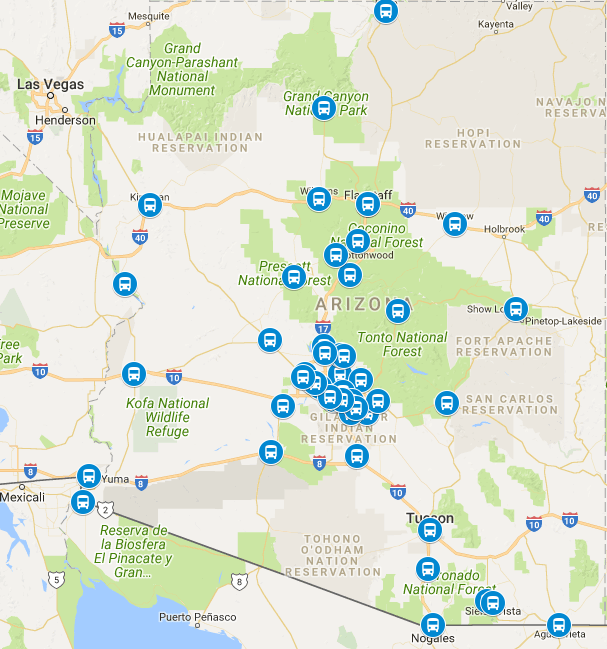

.png?width=30&height=30&name=icons8-facebook-30%20(1).png "Airport Shuttle Phoenix Facebook")