How to Book Your Airport Shuttle in Less Than 5 Minutes: A Step-by-Step Guide for Stress-Free Travel
Booking an airport shuttle may seem like small potatoes compared to planning your flight, packing your bags, and managing accommodations. how early to arrive at PHX However, saving time on something as simple as shuttle transportation can free you for more important travel details. airport shuttle vs rideshare options Whether you’re traveling for business, vacation, or family matters, planning your airport transportation doesn’t have to be complex or time-consuming. In today’s fast-paced world, time is more valuable than ever, which is why Airport Shuttle of Phoenix has created the simplest, most streamlined booking process to get you on the road in under 5 minutes. In this detailed guide, we’ll show you exactly how to book your shuttle quickly and effortlessly.
Step 1: Visit the Airport Shuttle of Phoenix Website
Why This Matters:
Navigating an intuitive website saves time and frustration. Airport Shuttle of Phoenix offers a user-friendly interface designed for a quick and straightforward booking experience. Whether you access the site from your laptop, tablet, or smartphone, it has been optimized for seamless navigation to help you make your booking in record time.
- Actionable Tip:
For a faster experience, bookmark our homepage so you can access it easily for future bookings.
- How It Works:
Once you load our homepage, you’ll immediately see the “Book Now” button prominently displayed. Clicking it will take you directly to the online booking form. From there, simply enter the required information, and you'll be well on your way to securing your ride.
Step 2: Select Your Pick-Up and Drop-Off Locations
Why This Matters:
The most critical information we need is where to pick you up and drop you off. Whether it’s your home, hotel, business, or Phoenix Sky Harbor Airport, our easy-to-navigate site will allow you to input your locations quickly without needing to guess exactly where you need to be. arriving at Phoenix Sky Harbor
- Actionable Tip:
Start typing your pick-up location, and the website will auto-suggest locations based on what you enter. This feature helps you find addresses faster, saving you time scrolling or searching.
- How It Works:
For the drop-off location, choose between popular airport terminals or specific city drop-off spots around Phoenix, giving you flexibility if you're traveling in a group or heading to a different city from the airport.
Step 3: Choose Your Date and Time
Why This Matters:
When booking airport transportation, timing is everything. Airport Shuttle of Phoenix offers adaptable scheduling options, which ensure we arrive at your location when it’s most convenient for you.
- Actionable Tip:
Book your shuttle 24 hours ahead for optimal availability. However, for those last-minute moments, we offer same-day and next-day service whenever possible.
- How It Works:
After inputting your pick-up and drop-off locations, you’ll be prompted to choose your desired date and time. The calendar tool on our booking page makes date selection easy, while a detailed time-picker allows you to specify morning, afternoon, evening, or nighttime rides.
Step 4: Choose Your Shuttle Type
Why This Matters:
Not every travel scenario is the same. Whether you’re traveling solo, with family, or in a business group, Airport Shuttle of Phoenix offers different shuttle types to meet your unique needs.
- Actionable Tip:
If you’re traveling alone and looking to save money, consider our shared shuttle service. If you want more privacy and a direct ride, select our exclusive private shuttle.
- Shuttle Options Include:
- Shared Shuttle: Cost-effective and environmentally friendly. Perfect for solo travelers or small groups comfortable with sharing a ride.
- Private Shuttle: Offers more privacy and a direct trip between the airport and your location, ideal for families, business trips, or those who need extra space.
- Group Van: Traveling with a large group? Our group van provides comfortable accommodations for larger parties, ensuring a hassle-free ride.
Step 5: Enter Passenger Details
Why This Matters:
To confirm your booking, you’ll need to input key information like the number of passengers, luggage quantity, flight information (if applicable), and if you have any special requests.
- Actionable Tip:
List any children or passengers who may need a car seat or booster. We provide those upon request to ensure your family’s safety is prioritized.
- How It Works:
Be as detailed as possible when filling out the passenger form. If you’re traveling with oversized luggage such as sports equipment or musical instruments, let us know so we can accommodate your needs ahead of time.
Step 6: Review Pricing and Payment
Why This Matters:
At Airport Shuttle of Phoenix, we pride ourselves on transparent pricing with no hidden fees. Understanding the costs upfront ensures you know exactly what you’re paying for.
- Actionable Tip:
Before inputting payment details, make sure that all the info you entered—locations, dates, times, and the number of passengers—is correct. Take a minute to review your trip summary that’s displayed before you finalize the transaction.
- How It Works:
Once you’ve confirmed your information, enter your payment details via credit card, debit card, or PayPal. You can also check for ongoing promotions or discounts.
Step 7: Confirm Your Shuttle Booking
Why This Matters:
This is the final step before your booking is complete. After reviewing all the details, simply click "Confirm Reservation" to finalize.
- Actionable Tip:
Once your reservation is confirmed, keep an eye out for an email that summarizes the trip information. It’s a good idea to screenshot or print it out for quick reference.
- How It Works:
After you click to confirm your booking, you’ll get an instant confirmation via email with all your trip details. You’ll also be provided with contact information for added peace of mind, should you need to reach out at any time before your shuttle ride.
No more wasting time or worrying about your airport transportation. Book your Phoenix Airport Shuttle today in less than 5 minutes. Just visit Airport Shuttle of Phoenix, follow the simple steps above, and we’ll ensure you get to Sky Harbor stress-free! Start your trip the right way— Reserve your ride now!
Booking your airport shuttle doesn’t have to be a drawn-out or stressful process. With Airport Shuttle of Phoenix, we’ve streamlined the entire experience so you can secure your ride in under 5 minutes, leaving you more time to focus on packing, your itinerary, or enjoying your trip. By following the simple steps outlined in this guide, you’ll be able to book, confirm, and relax before your airport ride even begins. If you’re ready for more stress-free travel tips, check out other helpful articles on our blog, where we provide valuable travel insights and advice for travelers visiting or leaving Phoenix.
How Fast Shuttle Booking Compares: Airport Shuttle of Phoenix vs. Other Providers
When travelers search "how to book shuttle fast," they're usually comparing options under time pressure. We looked at how major airport transportation brands — including SuperShuttle, which has served more than 85 airport locations worldwide, and Texas Shuttle, which runs reservations to and from DFW Airport and Dallas Love Field — structure their booking flows. Here's how our Phoenix-based process stacks up, so you can see exactly where your time goes before you click "Book Now."
| Feature | Airport Shuttle of Phoenix | Typical national providers |
|---|---|---|
| Booking time | Under 5 minutes online | Often 3 steps, but with more form fields |
| Advance booking window | Book 24 hours ahead for best availability; same-day when possible | Some providers recommend booking 48+ hours in advance for guaranteed rates |
| Confirmation | Instant email with full trip summary | Many send a voucher with your scheduled driver's name and phone number |
| Customer support | Phone and email support for Phoenix-area routes | 24/7 customer service by phone or live chat is standard |
| Pricing | Transparent quote before payment — no hidden fees | Locked-in price at booking is a common selling point |

Why Book in Advance Instead of Waiting Curbside?
Phoenix Sky Harbor International Airport is one of the busiest airports in the country, and the terminals along Sky Harbor Boulevard get congested fast — especially during spring training season and winter visitor months when snowbirds fill flights into PHX. Rides requested on the spot often mean waiting in cell-phone lot lines or surge-style uncertainty. When you book your shuttle in advance, your pickup time is locked in, your driver knows your flight details, and there's no guessing about availability after you land.
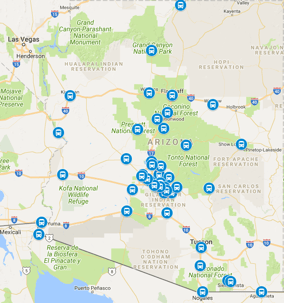
Advanced booking also matters for longer routes. If you're heading north on I-17 to Flagstaff or taking a shuttle from Phoenix to Sedona, reserving ahead lets us match you with the right vehicle — shared shuttle, private shuttle, or group van — and plan drive times around I-17 and SR 179 traffic rather than improvising on the day of travel.
What Happens After You Book: Confirmation, Driver Details, and Tracking
Fast booking is only half the equation — a reliable pickup is what actually gets you to the gate on time. After your reservation is confirmed, you'll receive an email summarizing your pick-up location, drop-off point, date, time, and vehicle type. Keep that confirmation handy on your phone, and save our contact number so you can reach a real person if your flight is delayed or your gate changes.
For airport pickups, plan to meet your driver at the designated ground transportation area for your terminal. If you're arriving at Terminal 4 — where most major carriers operate — follow the signs toward ground transport after collecting your bags. Your confirmation email will include everything you need to connect quickly, and our team can help you locate your driver if anything is unclear.
Frequently Asked Questions About Booking a Shuttle Fast
How far in advance should I book my shuttle?
We recommend booking at least 24 hours ahead for the best vehicle selection. If your trip falls during a busy period — spring training, holiday weekends, or major events downtown near the Convention Center — book earlier. Same-day and next-day requests are accommodated whenever possible.
Can I book a shuttle in under 5 minutes?
Yes. The online form walks you through locations, date and time, vehicle type, passenger details, and payment in a single streamlined flow. Most travelers complete it in a few minutes.
Do you pick up at Phoenix Sky Harbor Airport?
Yes. We provide pickups and drop-offs at Sky Harbor, plus door-to-door service to homes, hotels, and businesses across the Valley — including Tempe, Scottsdale, Mesa, Glendale, and Chandler.
What if my flight is delayed?
Contact us by phone or email as soon as you know. Sharing your flight number during booking helps us stay on top of schedule changes and adjust your pickup.
Is the price I see the price I pay?
Yes. You'll review a complete trip summary with your total before entering payment — no hidden fees added afterward.
Do you provide car seats for children?
Yes. Request a car seat or booster in the passenger details section, and we'll have it ready for your ride.
Can I book a shuttle from Phoenix to other Arizona cities?
Absolutely. We serve routes beyond the Valley, including Phoenix to Flagstaff and Williams — the gateway to the Grand Canyon Railway. Check our blog for route guides and travel tips.